Security - Public
Giving Public access to a resource in Warewolf is like turning off security for that resource.
To acheive this, you need to do 2 things:
- Give the Resource Public Permissions
- Either the whole server:
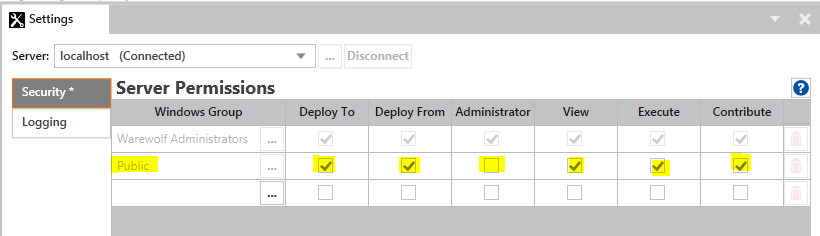
- Or just the Resource:

- Make sure both View and Execute are selected to execute the resource from outside Warewolf e.g. a browser and click Save at the bottom of the page.
- Either the whole server:
- Change /service/ or /secure/ in the URL to /public/ e.g.
<a href="http://myserver:3142/secure/Hello World.xml">http://myserver:3142/secure/Hello World.xml</a>

Changes to:

<a href="http://myserver:3142/public/Hello World.xml
</a>">http://myserver:3142/public/Hello World.xml</a>
Customer support service by UserEcho
