Deploying
Deploying in Warewolf Easy Service Bus (ESB) allows you to move resources between servers.
To deploy items from server A to Server B, your connection to server A must have Deploy From rights and your connection to server B must have Deploy To rights. These rights can be found in Settings > Security.
The only way of moving resources is to use the Deploy screen. Warewolf verifies each resource and digitally re-signs the resource at the destination to prevent unauthorised resources from being executed. If a resource is not signed by a server, that server cannot load it.
To deploy from one server to another follow these simple steps:
- Click the Deploy icon in the ribbon bar

- Select the Source Server. This is the server you want to deploy from. Make sure the server is connected.
- Select the Destination Server. This is the server you want to deploy to. Make sure the server is connected.
- Select the Checkbox(s) of the items you would like to move.
- You can click the Select All Dependencies button at the bottom of the page to auto select the items that are required by the items you have already selected. If the items are already present in the right version at the destination, then this is not necessary.
- If an item is highlighted in orange, then a version of it already exists at the destination. Even if the name at the destination has changed, you will be notified of the conflict as every resource has a shared key.
- Click the Deploy button at the bottom right of the page.
- If you try and deploy a resource that already exists in the destination server you will get a notification asking you if you want to overwrite the resource in the destination server.
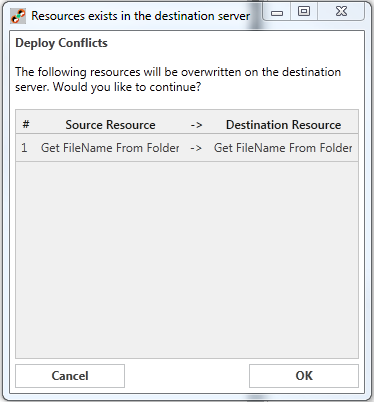
- Click OK to proceed.
Customer support service by UserEcho
